Courses / AI Images & Video / Lesson 5 of 7
Create a Short AI Video
Plan a short clip like a director (one shot, one action, one line), then prompt it, review it, fix it, and edit clips into a finished piece.
Start with an example
AIH’s own guide, R.I.C.K. Bot, was made with the techniques in this lesson. Each clip was planned like a single camera shot:
Who: R.I.C.K. Bot, a friendly navy-and-gold robot with cyan eyes, holding a glowing tablet.
What happens: He raises his hand and waves at the camera, then speaks.
Camera: Slow push-in at eye level.
Light: Bright studio with a soft navy-to-white background.
Sound: He says, “Hey, I’m R.I.C.K. Bot, your guide at Applied Intelligence Holdings. Glad you’re here.”
Every clip started from the same set of reference images, so he looks like the same character in all of them. Four clips edited together make a 30-second greeting.
How AI video models work
Video models build on the diffusion idea you learned in Lesson 1, with a big extra challenge: time.
A video is a series of still frames, often 24 per second. An 8-second clip is about 200 images that must:
- Show the same subject with the same face, clothes, and colors in every frame
- Keep the lighting and background consistent
- Create believable motion from one frame to the next
- Match the sound, such as lips moving with dialogue, in tools that generate audio
That’s why video takes longer and costs more than images, and why it can show glitches: a hand that changes shape mid-gesture, an object that appears from nowhere, or text that shimmers. The model is predicting motion patterns, not following the laws of physics.
Think like a director
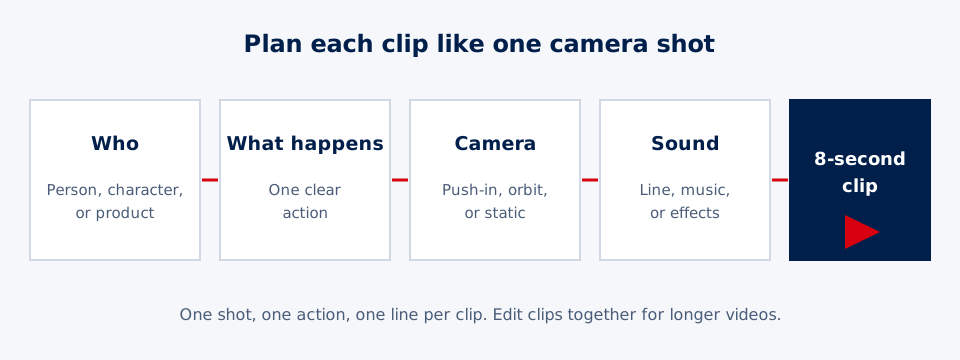
AI video tools usually generate clips of about 4 to 15 seconds. Plan your video as a set of shots, and give each one a clear description:
| Part | Describe | Example |
|---|---|---|
| Who | The person, character, or product | “A smiling baker in a flour-dusted apron” |
| What happens | One clear action | “Pulls a tray of croissants from the oven” |
| Camera | How we see it | “Slow push-in, eye level” |
| Light and style | The look | “Warm early-morning light, realistic” |
| Sound | Dialogue, music, or effects | “She says, ‘Fresh every morning at six.’” |
| Format | Shape | “Vertical 9:16” |
One action per clip. “She pulls the tray out, sets it down, waves, walks to the counter, and hands a croissant to a customer” is five actions. The model will rush, blend, or skip them. Split it into separate clips.
Camera movement vocabulary
| Movement | What it does | Feeling |
|---|---|---|
| Static | Camera doesn’t move | Calm, focused |
| Push-in (dolly in) | Moves closer to the subject | Builds attention or emotion |
| Pull-out | Moves away | Reveals the setting |
| Pan | Turns left or right | Follows action or shows a space |
| Orbit | Circles the subject | Shows off a product or character |
| Tracking shot | Follows a moving subject | Energy, journey |
| Handheld | Slight natural shake | Real, documentary, user-generated feel |
Dialogue and timing
Many video tools can now generate speech. Keep lines short:
- People speak about 2 to 3 words per second.
- An 8-second clip fits about 16 to 20 words comfortably.
- Put the exact line in quotation marks: He says: “Fresh every morning at six.”
- If the voice changes between clips, consider recording or generating the voiceover separately and adding it during editing.
Two ways to start
- Text to video: Describe the whole shot in words. Fastest, but least control over how the character or product looks.
- Image to video: Start from a still you’ve approved, from Lessons 1–3, and describe only the motion. This is the best way to keep a character, product, or logo consistent, and it’s how professional AI creators work.
Video tools include Google Veo, OpenAI Sora, Runway, Kling, and others, often available inside other apps. Plans, limits, and prices change often, so check what your account includes.
Save money: still first, then motion
Video generation uses many more credits than images. A smart, professional workflow:
- Design the scene as a still image and refine it until it’s right.
- Animate that still with a shot description focused on motion and camera.
- Fix with small changes: “Same shot, but a slower camera” or “Same scene; she smiles at the end.”
- Approve each clip before moving to the next.
From clips to a finished video
A finished ad or explainer is built in an editor, such as CapCut, Canva, Adobe Express, or iMovie:
- Arrange your clips in order.
- Trim the start and end of each clip to remove awkward frames.
- Add captions. Most social video is watched without sound, so captions matter.
- Add music, your logo, and on-screen text. Don’t ask the AI to generate text inside the video, because it often garbles it.
- Export in the right format for each platform.
Common problems and fixes
| Problem | Fix |
|---|---|
| Character looks different in each clip | Start every clip from the same reference image |
| Too much happening | One action per clip |
| Weird hands or faces | Use a wider shot, simplify the action, or regenerate |
| Voice changes between clips | Generate or record the voiceover once and add it in editing |
| Text is garbled | Add text later in an editor |
| Motion looks frozen or dull | Add a specific camera move and a clear action verb |
A worked example: a 3-clip ad
Carlos owns a small bike repair shop and wants a 24-second Instagram Reel. His shot plan:
| Clip | Action | Camera | Line |
|---|---|---|---|
| 1. Hook | A frustrated teen looks at a flat bike tire on a sidewalk | Slow push-in | “Flat tire, and practice is in an hour.” |
| 2. Solution | Carlos swaps the tube at his workbench, then spins the wheel | Orbit around the bench | “Walk in, ride out. Most fixes take 20 minutes.” |
| 3. Call to action | The teen rides away down a sunny street | Tracking shot | “Carlos’s Cycles, on Milwaukee Avenue. Open till 7.” |
He makes a reference still of himself at the workbench first. Clip 2 comes out with his hands blurring during the repair, so he simplifies the action to “spins the repaired wheel and gives a thumbs up” and regenerates. He edits all three clips in CapCut, adds captions and his logo, and labels the post as AI-generated, as his platform requires.
Be honest
- Label realistic AI video when you post it. Major platforms, including YouTube, TikTok, Instagram, and Facebook, require labels for realistic AI content.
- No fake testimonials or fake customers. The FTC treats fake reviews as deceptive, and its rules allow penalties for them.
- Don’t recreate real people’s faces or voices without their written permission.
Think deeper: why video is so much harder
An image only has to look right once. A video has to look right about 200 times in a row. An eight-second clip at 24 frames per second is nearly 200 images, and every one has to match the one before it. A face can’t change shape. A shirt can’t change color. That challenge is called consistency, and it’s why video costs so much more than images.
Video models learned what motion usually looks like, not the laws of physics. They’ve seen millions of people walking and liquids pouring, so common actions look great. Unusual ones, like hands doing something complicated or objects passing behind other objects, can glitch. Keeping actions simple, clips short, and tricky details off-camera all help.
Keeping a character the same across clips is a separate problem. Each clip is generated fresh, so professionals use a character sheet: approved reference images from several angles plus the exact same description every time. Cartoon studios have done this for decades so that many artists draw a character the same way.
Questions to sit with:
- An AI video can look real without the AI understanding gravity, cause, or effect. What does that suggest about the difference between looking right and being right?
- As AI video gets more realistic, what will you need to see before you believe a video is real?
Project
Plan and create a 3-clip mini ad: a hook, a solution, and a call to action. Write a shot plan for each clip, create a reference still to keep your main character or product consistent, generate each clip, improve at least one with a follow-up, and edit the clips together with captions in a free editor.
Prompt template
R - Role: You are a film director making a short social video.
I - Instructions: Create an 8-second clip of [who] [doing what].
C - Context: Setting: [where]. Style: [realistic / 3D animated / cinematic]. Mood: [upbeat, calm]. Camera: [slow push-in / static / orbit / follows the subject]. Lighting: [golden hour, studio, neon].
K - Key Output: [Vertical 9:16 / wide 16:9]. Sound: [the person says: "..." / upbeat music / room sounds]. No on-screen text.
Try it
Write a shot plan for a 3-clip ad: a hook (the problem), a solution (your product or idea), and a call to action. For each clip, write one sentence of action, one camera movement, and one line of dialogue under 20 words. Read the lines aloud with a timer to make sure each fits in 8 seconds.
Your project
Plan and create a 3-clip mini ad (hook, solution, call to action) for your business, school, or brand. Write a shot plan for each clip first. Create a reference still to keep the main character or product consistent, generate each clip from it, improve at least one clip with a follow-up, and edit the clips together with captions in a free editor.
Key takeaways
- AI video models generate short clips, usually 4 to 15 seconds. Plan one shot, one action, one line per clip.
- A shot description names who, what happens, camera movement, light, and sound.
- Start from an approved still image to keep characters and products consistent and to save credits.
- Longer videos are built in an editor by combining short clips with captions, music, and transitions.
- Label realistic AI video, never fake testimonials, and never imitate real people without permission.
Finish your project and pass the knowledge check to complete this lesson.