
Courses / Automation with AI / Lesson 1 of 6
Where Automation Actually Pays Off
Not everything should be automated. Learn the four signs of a good candidate, score your own tasks, and calculate what automation is really worth.
Start with an example
A small property management office has two tasks on its plate:
- Task A: Sending a “we got your maintenance request” confirmation to tenants. It happens 60 times a month, takes 4 minutes each, and the steps never change.
- Task B: Deciding whether to renew a difficult tenant’s lease. It happens twice a month, takes an hour each, and requires judgment, history, and knowledge of housing law.
At first glance, Task B looks more important, and it is. But it’s a terrible candidate for automation. Task A saves 4 hours a month with almost no risk. Task B should stay with a person, though AI might help by summarizing the tenant’s payment history before the meeting.
The skill this lesson teaches is telling these two kinds of tasks apart, quickly and with numbers.
The automation sweet spot
The best tasks to automate share four traits:
- Frequent: They happen daily or weekly, so savings add up.
- Repetitive: The steps are the same every time.
- Rule-based: You could write the steps as “if this happens, then do that.”
- Low risk: A small error is easy to catch and fix, and nobody gets hurt.
A task with all four is a strong candidate. A task with none of them should stay with people.
How AI changes the picture
Before AI, automation only handled tasks with perfect rules: copy this, move that, send this exact message. Anything involving reading or writing had to be done by a person.
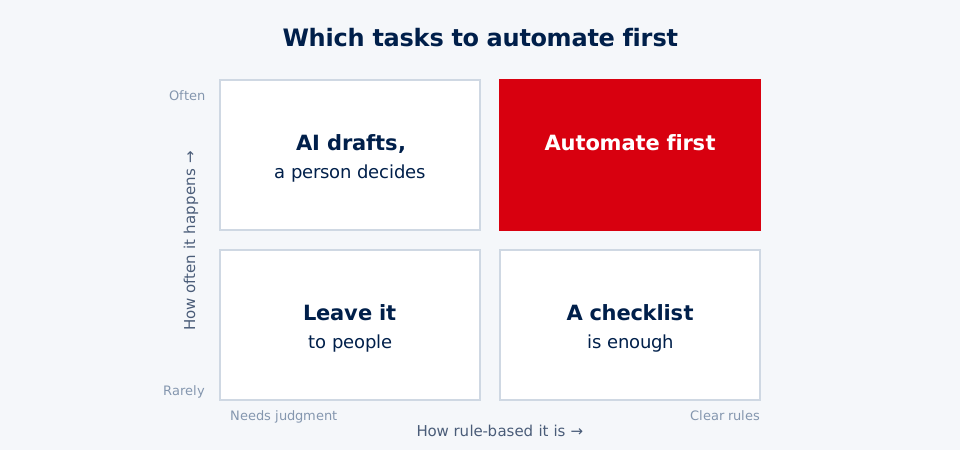
AI adds a middle option: drafting. It can read a message, summarize a form, or write a personalized reply. That means three categories instead of two:
| Category | What it means | Examples |
|---|---|---|
| Automate fully | Rule-based, low-risk steps run on their own | Send a confirmation, add a spreadsheet row, set a reminder |
| AI drafts, person approves | AI does the writing or sorting; a person reviews | Customer replies, proposal drafts, summarizing applications |
| Leave to people | High-stakes, sensitive, or highly personal decisions | Hiring, crisis response, medical or legal judgments |
The middle category is where many organizations find their biggest wins today.
Score your tasks
Use a simple scoring system to compare tasks fairly. Rate each task from 1 (low) to 5 (high):
- Frequency: How often does it happen? (5 = many times a day)
- Rule-based: How clear and consistent are the steps? (5 = exactly the same every time)
- Time: How long does it take each time? (5 = 15+ minutes)
Multiply the three scores. The highest totals are your best candidates.
| Task | Frequency | Rule-based | Time | Score |
|---|---|---|---|---|
| Confirmation emails | 5 | 5 | 2 | 50 |
| Weekly sales summary | 3 | 4 | 4 | 48 |
| Replying to reviews | 4 | 2 | 3 | 24 |
| Annual budget | 1 | 2 | 5 | 10 |
Then apply the risk check: if a mistake could hurt someone or break a law, move that task to “AI drafts, person approves” or “leave to people,” no matter its score.
Do the math
Before you build anything, estimate the value:
Minutes per task × times per month = minutes saved per month
Then turn it into money:
(Minutes saved ÷ 60) × hourly cost × 12 = yearly value
Example: A task takes 6 minutes and happens 50 times a month.
- 6 × 50 = 300 minutes (5 hours) a month
- 5 hours × $25 per hour × 12 = $1,500 a year
- Subtract tool costs of $30 a month ($360 a year) = $1,140 net value
That’s from one small workflow. Most organizations have five to ten tasks like this.
Don’t forget hidden benefits: faster response times, fewer forgotten steps, and less stress for staff. These are harder to measure but often matter just as much.
Warning signs: fix before you automate
Pause before automating if:
- The process changes every week. You’ll spend more time updating the automation than you save.
- Nobody agrees on how it works today. Automation can’t settle a disagreement; it just picks one version.
- Mistakes would harm someone. A wrong message to a patient, client, or student can do real damage.
- It involves sensitive data and your tools aren’t approved for it.
Fix the process first. Then automate it. Automating a messy process just makes the mess happen faster.
A worked example: a food pantry finds its first win
Rosa coordinates a community food pantry with 40 volunteers. She lists five weekly tasks and scores them:
| Task | Freq. | Rules | Time | Score | Risk |
|---|---|---|---|---|---|
| Volunteer shift reminders | 5 | 5 | 3 | 75 | Low |
| Logging donations in a spreadsheet | 4 | 5 | 3 | 60 | Low |
| Answering “what can I donate?” emails | 4 | 3 | 2 | 24 | Low |
| Grant reports | 1 | 2 | 5 | 10 | Medium |
| Deciding emergency food requests | 3 | 1 | 3 | 9 | High |
Shift reminders win. Rosa does the math: 3 minutes per reminder × 160 reminders a month = 480 minutes, or 8 hours a month. That’s about 96 hours a year of her time, which she can spend on donor relationships instead.
She also notes that emergency food requests score low and are high-risk, because they involve people’s urgent needs. Those stay with her team, with no automation.
Think deeper: the hidden costs of saving time
“Minutes saved × how often” is a great starting point. But the real math has a few more pieces.
Upkeep counts. Building, testing, training people, and fixing the workflow when an app changes all take time. A workflow that saves 5 hours a month but needs 3 hours of upkeep only saves 2. That’s the difference between gross and net benefit.
Mistakes change shape. People make random mistakes: one typo, one forgotten step. Automations make systematic mistakes: if it’s set up wrong, it’s wrong for every customer until someone notices. That’s why risk, not just frequency, decides how much human checking a workflow needs.
There are ripple effects. Faster replies can mean happier customers. Freed-up time can go to work that needs a human touch. But if people stop understanding the process, nobody knows how to step in when the automation breaks.
People decide whether it works. Research on new technology keeps finding the same thing: people support automation when it removes tedious work and when they help design it. They resist it when it’s forced on them without explanation. The best automations aren’t the fanciest. They’re the ones people trust and actually use.
Questions to sit with:
- If an automation saves a team 10 hours a week, who should decide what happens with that time, and why?
- What’s a task in your life that seems easy to automate but probably shouldn’t be? What makes it different?
Practice: find your first automation
- List five tasks you do every week at work, at school, or in a club.
- Score each from 1 to 5 on Frequency, Rule-based, and Time, and multiply.
- Check risk for your top three. Move any high-risk task to “AI drafts” or “leave to people.”
- Calculate monthly time saved and yearly value for your top task.
- Write one sentence: “I’ll automate ___ because it saves about ___ hours a month with low risk.”
Next, you’ll map that task step by step before building anything.
Try it
List 5 tasks you do every week. Score each from 1 to 5 on Frequency, Rule-based, and Time per task, then multiply the three scores. For your top task, calculate monthly time saved and yearly value. That task is your first automation candidate, and you'll map it in the next lesson.
Key takeaways
- Automate tasks that are frequent, repetitive, rule-based, and low risk.
- AI adds a middle option: it can draft work that needs some judgment, while a person decides.
- Calculate value with: minutes per task × times per month × hourly cost.
- Fix a messy process before you automate it, or you'll just make the mess faster.
- Start with one small workflow, prove the value with numbers, then expand.
Pass the knowledge check to complete this lesson.