Courses / AI Fundamentals / Lesson 5 of 6
Using AI Responsibly: Accuracy, Privacy, and Bias
Three risks every AI user has to manage, and a 5-question check to use before anything AI-made goes out the door.
Start with an example
A nonprofit uses AI to draft its annual grant report. The draft reads beautifully, until the director notices it says the program served “over 2,000 families.” The real number is 840. The AI filled a gap with a believable number.
Caught before sending, that’s a two-second edit. Caught by the funder, it’s a trust problem that could cost the organization its grant.
Now imagine two more versions of this story. In one, a staff member pasted families’ names and home addresses into a free AI tool to “save time.” In another, the AI described the families in a way that leaned on stereotypes. Different mistakes, same lesson: responsible AI use is mostly about simple habits that catch problems early.
This lesson covers the three big risks, accuracy, privacy, and bias, plus when to be open about using AI.
Risk 1: Accuracy
You learned in Lesson 4 that AI can produce confident mistakes. The fix is a habit, not a talent.
Always check before you use:
- Facts, numbers, statistics, and dates
- Names, titles, and quotes
- Links and citations (open them and confirm they exist)
- Anything legal, medical, or financial, which should also be reviewed by a qualified person
The responsibility rule: If your name or your organization’s name is on it, you own every word, no matter who or what drafted it. “The AI wrote it” is not a defense your customers, your boss, or a court will accept.
Risk 2: Privacy
When you type into an AI tool, your words travel to a company’s servers. Depending on the tool, your plan, and your settings, that information may be stored, reviewed by staff for safety, or used to improve the product.
Never paste these in unless your organization has approved the tool for it:
- Passwords, account numbers, Social Security numbers
- Client or patient health information. In the U.S., health information handled by medical providers and their partners is protected by a law called HIPAA.
- Student records, which are protected by a law called FERPA
- Employee files, confidential contracts, or anything under a non-disclosure agreement (NDA)
Safer habits:
- De-identify. Replace names with “Client A” or “the employee.” Remove addresses, birthdates, and ID numbers. The AI rarely needs them.
- Use the right version. Many AI companies offer business or enterprise plans with stronger data protections, such as promising not to train on your data. Free personal accounts usually have fewer protections.
- Check the settings. Many tools let you turn off chat history or opt out of training. Find those settings and use them.
- When in doubt, leave it out.
Risk 3: Bias
AI learned from enormous amounts of human writing, and human writing contains unfair patterns. Those patterns can show up in AI output in quiet ways:
- A job description that uses language that discourages certain groups from applying
- Image generators that show only men when asked for “a CEO” or only women for “a nurse”
- Summaries that describe one neighborhood more negatively than another
- Screening tools that score applicants lower because of gaps in work history, which can unfairly affect parents, caregivers, or people who served in the military
Bias matters most when AI touches decisions about people’s opportunities: hiring, lending, housing, school admissions, services, and discipline. In those areas, a person must review decisions and watch for unfair patterns. Some laws already require this. For example, Illinois regulates the use of AI in video job interviews and hiring decisions, and New York City requires bias audits for certain automated hiring tools.
A quick bias check: Read the output and ask, “Would this be fair if it were about me, my family, or my neighborhood?” If the answer is no, revise it.
Be open when it matters
You don’t need to put “written with AI” on every email. But be transparent when people would reasonably want to know, for example:
- Customers chatting with an AI assistant instead of a person
- AI-generated images or video in advertising, especially realistic images of people
- AI-assisted decisions that affect someone, like an application review
- Schoolwork, where your teacher or school has rules about AI use
Being open builds trust. Being caught hiding it destroys trust.
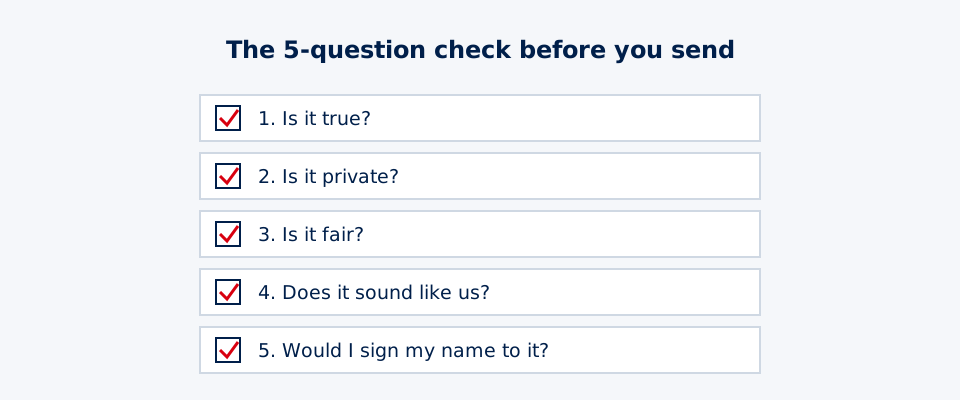
The 5-question check
Before anything AI-assisted goes out, ask:
- Is it true? Facts, numbers, and sources are checked.
- Is it private? No sensitive information is exposed.
- Is it fair? No one is treated unfairly or described with stereotypes.
- Does it sound like us? The voice and tone fit your brand or your style.
- Would I sign my name to it? If not, keep editing.
A worked example: the check in action
Marcus runs hiring for a small HVAC company. He asks AI to write a job posting for a service technician and to suggest screening questions.
The draft says: “Looking for a young, energetic guy who can climb ladders all day. Must have no gaps in employment.”
Marcus runs the 5-question check:
- Is it true? The posting lists a pay range the AI invented. He replaces it with the real range.
- Is it private? He pasted in a current employee’s review as an example. He deletes that and uses a made-up example instead.
- Is it fair? “Young” and “guy” could discourage qualified applicants based on age and gender, and could create legal problems. “No gaps in employment” could unfairly screen out parents and veterans. He rewrites: “Seeking a motivated technician comfortable with physical work, including ladders.”
- Does it sound like us? He adds a line about the company’s family-owned history.
- Would I sign my name to it? Now, yes.
The AI saved him an hour of writing. The check saved him from a posting that could have hurt his company’s reputation and exposed it to a discrimination complaint.
Think deeper: bias nobody meant to build
AI bias usually isn’t added on purpose. It slips in through three doors:
- The data. If an image model mostly saw photos of male CEOs, it will mostly draw male CEOs.
- The goal it was given. A hiring tool trained to find people who “look like our past successful hires” will copy whatever unfairness existed in past hiring.
- Where it’s used. A tool that works well for one group may work poorly for another. Speech recognition, for example, has historically made more mistakes with some accents.
Because nobody intended it, bias can hide in plain sight. That’s why new laws focus on results and accountability, like bias audits and human review of big decisions, not just good intentions.
Privacy works the same way. When you send a prompt, it travels to the company’s servers, may be stored for a while, and, depending on your settings, may be used to train future models. Business plans often change those rules. In health care, a vendor may need a signed business associate agreement under HIPAA before it can handle patient information.
So the habits in this lesson aren’t just manners. Check the output because AI predicts instead of knowing. Share less because prompts leave your device. Keep people in charge of decisions because patterns from the past can repeat the past’s unfairness.
Questions to sit with:
- If an AI simply reflects the data it learned from, is a biased result the AI’s fault, the data’s fault, or the fault of whoever chose to use it?
- What’s one thing you’d never paste into a public AI tool, and why does that line feel right to you?
Practice: write your AI policy
- List the AI tools you use or plan to use.
- Write three things you will never paste into them.
- Name who reviews AI output before it goes out. If it’s just you, write “me, using the 5-question check.”
- Decide when you’ll tell people AI was involved.
- Share the policy with one other person and ask what you missed.
Keep it to one page. A short policy that people actually follow beats a long one nobody reads.
Next, you’ll learn how to pick the right AI tool for the job, because not every tool is built for every task.
Try it
Write a one-page AI policy for yourself, your team, or your club. Include: which tools you use, three things you will never paste in, who reviews AI output before it goes out, and when you'll tell people AI was used. Share it with one other person and ask what you missed.
Key takeaways
- Accuracy: check facts, numbers, names, dates, and links before you use AI output.
- Privacy: don't paste sensitive personal, client, or health information into tools that aren't approved for it.
- Bias: AI can repeat unfair patterns from its training data. A person must review anything that affects people's opportunities.
- Be open about AI use when the people you serve would reasonably want to know.
- Run the 5-question check before anything AI-assisted goes out.
Pass the knowledge check to complete this lesson.